Blogs

downlaodFree OCR Text to PDF Converter with Side-by-Side Review

The ImageRamptm OCR2PDF utility, is a free tool to create searchable PDF documents from your scanned archives. Turn your unintelligent paper files into intelligent assets with this free, highly accurate OCR engine.  

Easily:

  • Load multi-page TIFF or PDF documents (free version is limited to the first 10 pages)
  • Convert and review the results in a unique side-by-side viewer
  • Use synchronized zooming and page flippers for easy page review
  • Use optional onscreen keyboard
  • Produce PDF files for easy printing as compatible cover sheets
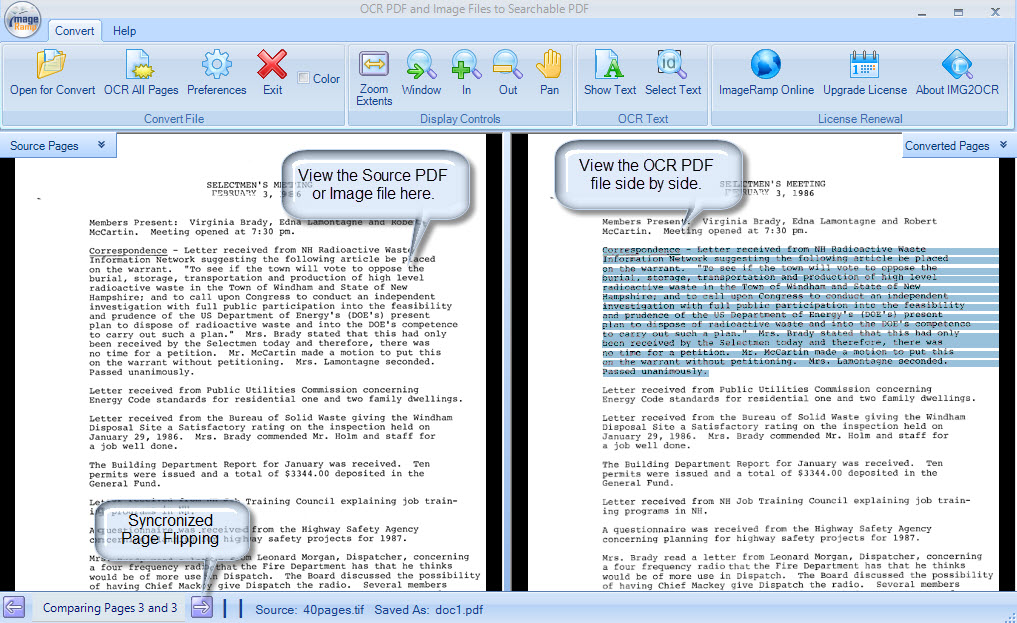
 UI OVerview
 
The ImageRamp OCR2PDF utility is simple to install and use in your environment. Use it to convert your paper archives into intelligent digital assets. 
 

Compare Free and Paid Versions

Free Version Paid Version
  • Limited to 10 page files
  • Autorotate/Autodeskew
  • TIFF or PDF input
  • Synchronized viewing
  • Thumbnails and page flippers
  • Basic zoom controls
  • Foreign language support
  • No page limit
  • Multi-core CPU support for faster OCR processing
  • Set allowed characters sets
  • Auto invert black pages
  • Ignore underlines
  • Invert white on black text zones
  • Smooth character rendering
  • Detect image inversions


Simple-to-Use Searchable PDF Creation

Easy-to-Use

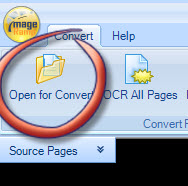
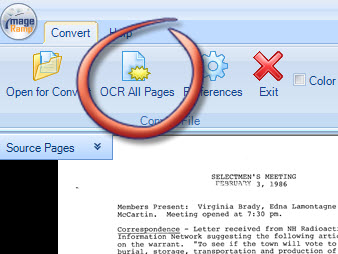
Two simple steps is all it takes to start your digital conversion. Open a file and start the OCR process.  It's that simple.  You'll be prompted for the output PDF file and away you go.

Step 1:  Open the source

PDF or TIF file

 OpenFile


Step 2:  Start the OCR process

OCRallpages


Unique Synchronized Viewing of PDF OCR Results

Once a file is converted you can easily review the results in the synchronized interface.  The original file is located in the left panel with the converted Searchable PDF file in the right pane.  Page flippers are available if multi-page files are found and you can navigate through the set with ease. SyncronizedPageFlippers
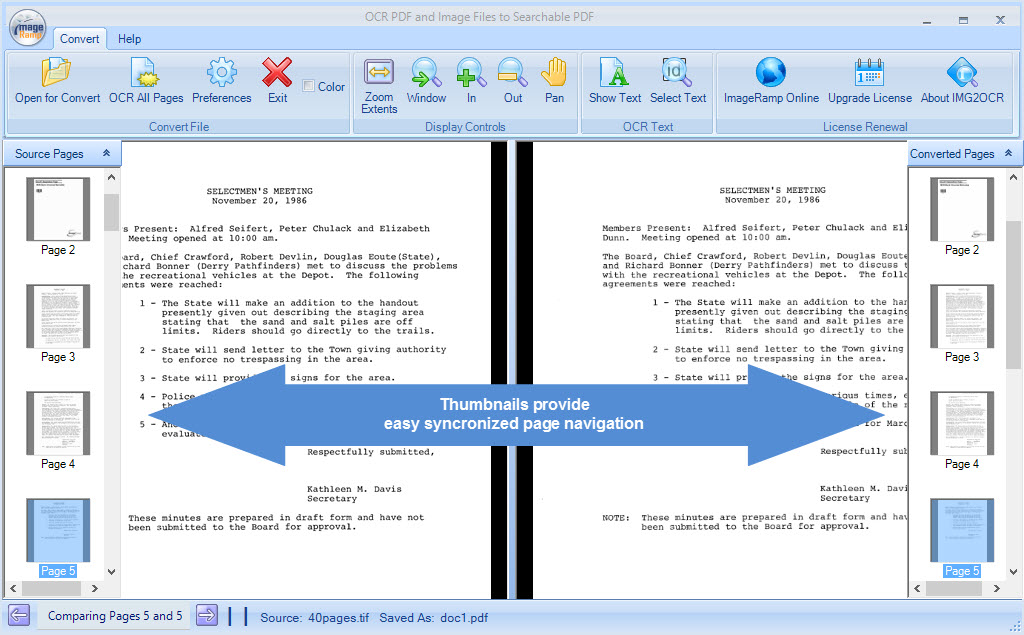
 

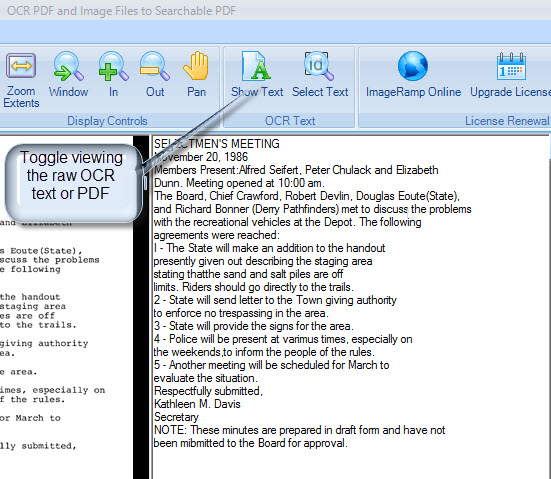
Review the Raw OCR Text

Toggle the OCR textYou can view the raw OCR text converted by the system to validate the OCR accuracy. For more accurate results, use the preferences settings to further improve on the text recognition accuracy.  

Upgrade 

Upgrading from the Free version

Read more at Improving OCR Accuracy

Full Featured Data Capture with ImageRamp

The Free ImageRamp OCR2PDF tool can be used as a standalone tool to OCR a TIFF or PDF File and create a searchbale PDF file. For full-featured data capture and document scanning checkout the ImageRamp Batch.

downlaod

Free

Download our most popular solution for your document processing needs.  You'll get a free version of ImageRamp Composer, a trial of ImageRamp Batch plus several fully functioning Free tools to produce OCR'd PDF, Create Barcode Separation Sheets, assemble PDF files and Validate barcode splits.

Free Personal Identity Privacy Inspection Tool

ImageRamp document capture and indexing softwareImageRamptm Composer, is a free tool to assemble and compose new PDF documents.  Easily import TIF, PNG, PDF, or Word files into a new PDF document that is safe and secure.   Upgrade to the full Base version and you get OCR conversion, enhanced Size Management, advanced thresholding, Barcode support for splitting, and much more.


Freely and Easily:

  • Load PDF, Image or MS Word documents
  • Import folders of documents
  • Re-arrange pages and easily retain links to the source document
  • Inspect documents for pattern infractions
  • Produce PDF files highlighting the infractions


Upgrade to the Basic Composer Edition:

  • OCR scanned files to searchable PDF
  • Reduce document sizes with advanced greyscale to binary thresholding tools
  • Extract barcodes and split files using barcode content for file names.
  • Add security and digital rights management

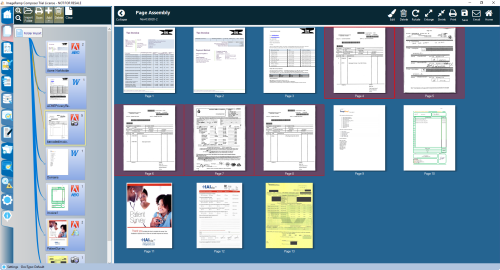
Easy assemble documents of different types with built in automatic conversion. 

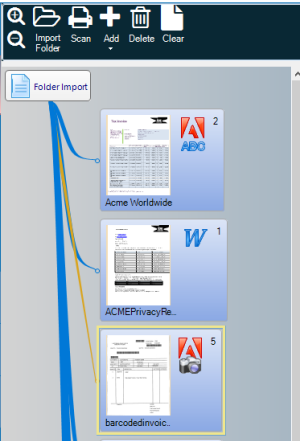
Simply select a source folder to import all files, or load individual scans or files into the document set.      

Easily import Word, PDF, or Image Files from Folders, scanners or other sources.  We'll flag the document type including PDFText, PDF OCR (Searchable PDF), or PDF Image Files.


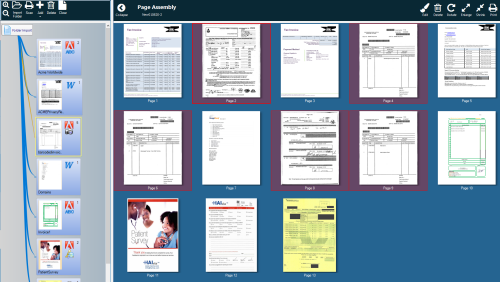
The thumbnails of the combined documents makes it easy to identify pages to their source documents.  Rearrange them with simple drag and drop operations. 


The edited pages still retain their links to the source document.


Manage file sizes with simplicity

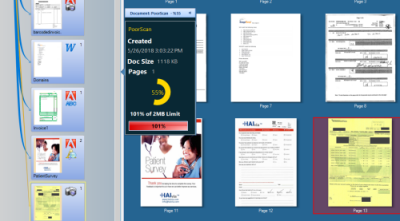
As files are added, we keep track of their approximate size impact on the newly created document.  You can even set a size maximum and the system identifies the documents percentage of your target size.  

Step 1: Sizing made easy

As you select source documents contained in your project, we'll showyou the documents approximate size and impact on the overall size, so you can easily identify pages or documents that may need reducing. 


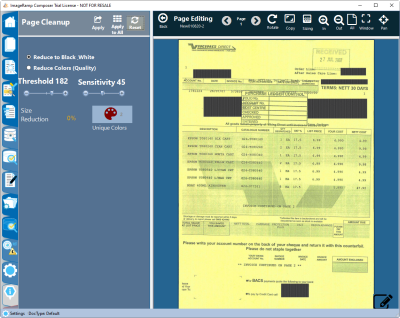
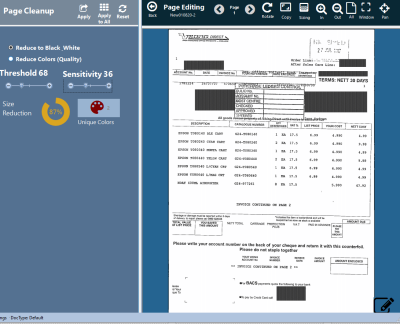
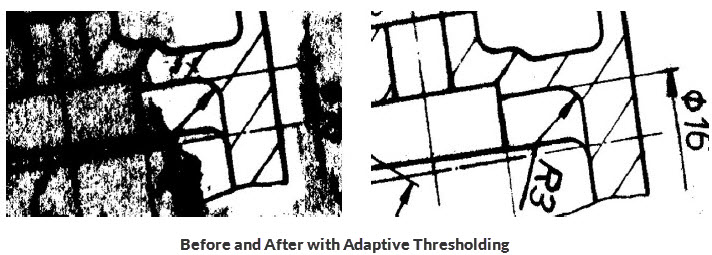
 Step 2: The sizing tool allows us to reduce file size using advanced 2D image processing.  Using sophisticated adaptive thresholding, we'll clean up and reduce your file size quickly and show you the impact. 


 Step 3:  Select Apply (licensed version) and the document is 2D thresholded in accordance to sensitivity and threshold values.  Simply move these values and watch your document legibility improve.  We even show you the estimated size reduction for that page. 


HAIvia Family for Data Capture, Analysis and Intelligence for Healthcare Decision Support

Infection Prevention Data Solution to Reduce HAIs and Improve Incentives

 docufi infection prevention analysis

With the new perspective on your data that HAIvia provides, make informed decisions to lower healthcare-associated infection (HAI) rates, better train environmental services personnel and manage facilities, and increase revenue. The HAIvia family of products captures and integrates your business information such as inspection reports, employee performance, inventory, and facilities management with data from the Centers for Medicare and Medicaid Services (CMS) to create a visual infection prevention Dashboard. The environmental services world is full of overwhelming data from both governmental and internal sources. HAIvia Dashboard efficiently decodes this information for optimal infection prevention and patient safety by managing and analyzing the cleaning environment. Infection prevention decision support has never been easier.

Learn More:

infection prevention dashboard


infection prevention mobile data capture

The HAIvia Dashboard presents visual and numeric summaries of information about selected hospital or facility units. This includes HAI standardized infection ratios, HCAHPS/HAC scores, departmental data, and more. A familiar navigation tree allows users to easily view staff reporting structure and select a specific facility to monitor their key performance indicators (KPI). Add integrated online training and decision makers can reduce costs through corrective learning assignment. Not only can key personnel see their employees' learning history, they can also track such things as quality assessments and reviews. Tying quality assessments with our learning system allows managers to easily, and often automatically, assign employees to needed courses.


HAIvia Mobile can save time, reduce costs, and eliminate paper and data entry errors by automating task-related forms and reporting. Combining HAIvia Mobile with HAIvia Dashboard offers detailed analysis of the data providing actionable information to help you in the fight against healthcare-associated infections (HAIs) and increase your Hospital Value-Based Purchasing incentive payments. Common, familiar mobile graphical interface features such as touchscreen entry and scroll data selection practically eliminate the need for application training.

For Infection Prevention Info, Tips and More

Visit our knowledge base of infection control information for articles, videos, forums, and tips on infection prevention, HAI control, and HAIvia products.

This email address is being protected from spambots. You need JavaScript enabled to view it.


Photo Credit: By biology pop (biology pop) [CC BY-SA 4.0
(http://creativecommons.org/licenses/by-sa/4.0)],
via Wikimedia Commons

How to Compare or Edit PDF image files

Compare Drawings with ComPara PDF and TIFF File Comparison ToolSimplify your image and drawing review and conversion needs with ComPara, a fast and efficient tool to compare and publish the differences in your multipage PDF and scanned TIFF image and drawing files. ComPara provides a tool to compare multipage drawing sets, identify or tag the differences, and publish them for easy communications with your teams and suppliers. Easily convert files to PDF, TIFF or JPG.  Or use RevisA to manipulate scanned files.  Use simple annotation tools, image cleanup tools and a simple interface to make changes to your scanned drawings with ease. 

Watch the YouTube product overview or our SlideShare presentation. ComPara is included at no charge with our ImageRamp PDF Composer tool. With PDF Composer, easily import PDF, Image, and Word documents into an easy-to-use environment to securely annotate, redact, encrypt and arrange your documents. 

ComPara Features 

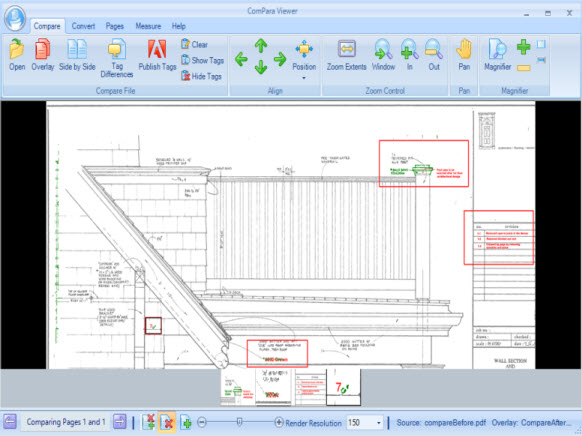
Compara overlay screen

Simple and Easy to Use

Easily identify and communicate drawing set differences on small and large multipage files.

Compare PDF or TIFF Files – Compare differences with vector or image-based PDF drawings or scanned TIFF drawings.

Multi-page Compare– Quickly flip through multi-page documents and compare drawing sets with ease. Use the page flipper to synchronize page comparisons, or navigate to any page pair for review.

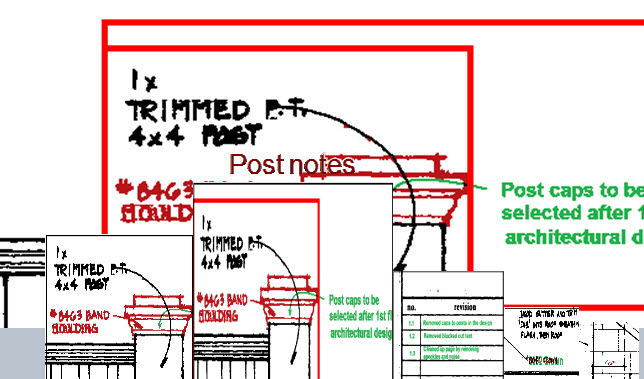
Tag Differences - Identify and name differences within multipage drawings.  As tags are made, thumbnails are created for easy bubble bar navigation and tags can be published for design team reviews.

Synchronized Side-by-Side Compare – Easily compare differences between files in a synchronized side-by-side viewer.  Any zooms, pans in one view are synchronized with the adjoining view.

Overlay Compare – Merge the two documents with color-coded additions and deletions in clear view.

Document Measurement – Calibrate and measure critical dimensions from your documents and drawings

Publish Tagged Differences– Create a new PDF file that contains changes found in the document. It eve5n publishes page pairs that contain the differences you tagged.

Manage Pages – Easily insert or replace pages from other files into your drawing file or delete selected pages. ComPara lets you extract individual pages and save them as separate files as well. And, easily rotate pages to correct page feed errors.

drawing document comparison with adaptive thresholding2D Adaptive Thresholding – Clean dirty documents with advanced adaptive thresholding. Adaptive thresholding assists in cleaning "dirty" documents or documents that have a colored background which interferes with the foreground data.
Convert Files – Open a PDF or TIFF file and easily save the whole file or select pages as PDF or TIFF files. Or, save pages individually to JPG format.


Learn more about out document processing automation tools:

ImageRamp Batch

A simple-to-use folder processing tool to automate your file naming and storage, indexing, and document capture into various EMR/EDR, document management or other secure storage environments

ImageRamp PDF Composer

Easily import PDF, Image, and Word documents into an easy-to-use environment to securely annotate, redact, encrypt and arrange your documents with ImageRamp PDF Composer

Contact Us


downlaod

Free

Download our most popular solution for your document processing needs.  You'll get a free version of ImageRamp Composer, a trial of ImageRamp Batch plus several fully functioning Free tools to produce OCR'd PDF, Create Barcode Separation Sheets, assemble PDF files and Validate barcode splits.

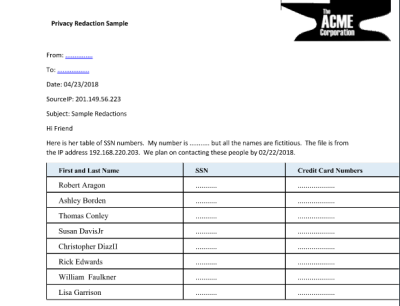
How to remove Personal Identity data from scanned files

Use ImageRamp Batch Enterprise or ImageRamp Composer to easily remove sensitive data from your documents.

ImageRamp document capture and indexing softwareImageRamptm Composer, is a tool to inspect and identify privacy data within your documents.  Easily inspect TIF, PNG, PDF, or Word files for common privacy patterns including Social Security Numbers, Credit Card Numbers, email addresses, gender and much more.  Use it to redact barcodes, social security numbers or other customized patterns from your documents.  We support scanned files as well as traditional text based documents like MS Word and PDF.  With the Privacy version, you can create your own patterns, edit existing patterns with full regular expressions and approve the infractions with Whiteout or Blackout patterns and full text removal. 


Freely and Easily:

  • Load PDF, Image or MS Word documents
  • Import folders of documents
  • Re-arrange pages and easily retain links to the source document
  • Inspect documents for pattern infractions
  • Produce PDF files highlighting the infractions


Upgrade to perform:

  • OCR and Inspect scanned files
  • Perform whiteout or blackout redactions
  • Fully redact identified patterns
  • Edit existing patterns
  • Create new user Regular Expression patterns
  • Barcode Redaction

Simple-to-Use Personal Identity Inspection

Easy One Click Processing

Simply select the Inspect button and all documents loaded into the current set are searched for patterns matching your identity requirements.     

Personal Identity Inspection

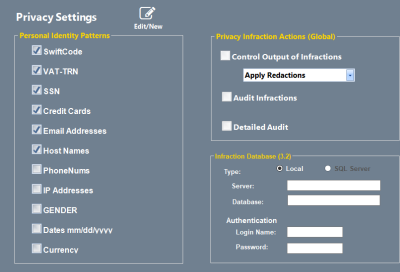
Step 1: Select the desired patterns to perform

inspections on.  Licensed users can have infraction

actions controlled and audited.

Easily configure search patterns for Personal Identity Management


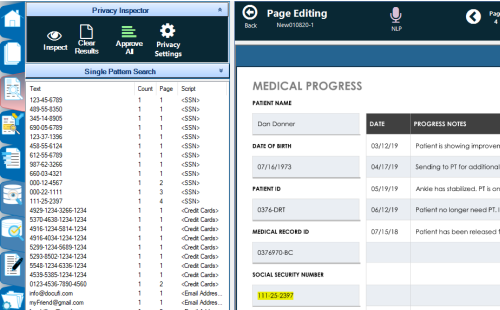
Step 2: Select the Inspect button and all documents loaded

are processed with infractions highlightedPrivacy Inspector finds Personal Information in documents


Step 3: Licensed users can approve and redact

the infractions from their documents.

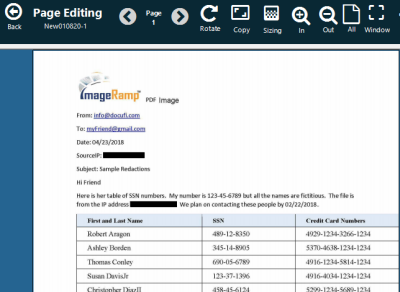
Redacted pages with privacy data removed

Individual Patterns

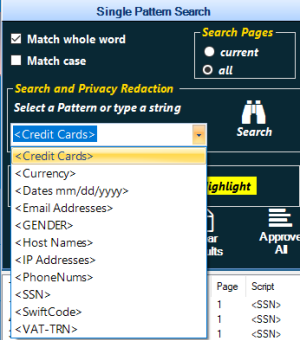
Step 1:  Select the desired pattern


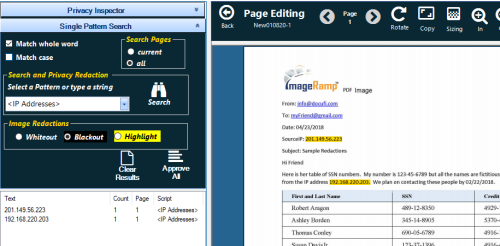
 Step 2:  Select search and patterns are highlightd


 Step 3:  Select approve (licensed version) and patterns are removed and images blacked out or white out. 


 Need your Own Cloud Services?

Redaction services are available as restful API services. Contact us at This email address is being protected from spambots. You need JavaScript enabled to view it. for more details.