Blogs

free trial download

Automated Cloud Based Document Processing

Watch Cloud Storage Drives or Select Individual Files for Processing

With our Docs In The Cloud Services (www.docsintheclouds.com) use zero footprint solutions to compose, secure, and process your local or cloud-stored documents with ease on any platform.  Use Windows, Mac, Android or iOS devices to process documents, search and retrieve or assemble. 

Our Docs In The Cloud Services adds simplicity, intelligence and efficiency to maximize your investment in the scanning process and is available as a monthly subscription services to meet your budgeting needs. 

 Register Today

A Visual Look at Key Docs In The Cloud Services


Cloud Storage Integration

Integrate with leading cloud storage platforms including Amazon S3 Storage, DropBox, Google Drive and SharePoint for watch document processing and delivery.  


Simple Document Assembly

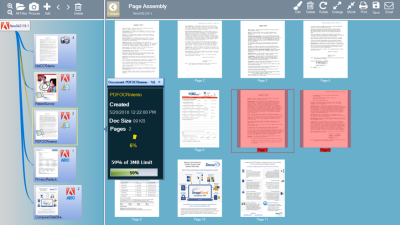
Easily import and assemble PDF text, PDF OCR, PDFText, MS Word, Scanned Image files and more into consolidated documents. 


Barcode Splitting and Naming

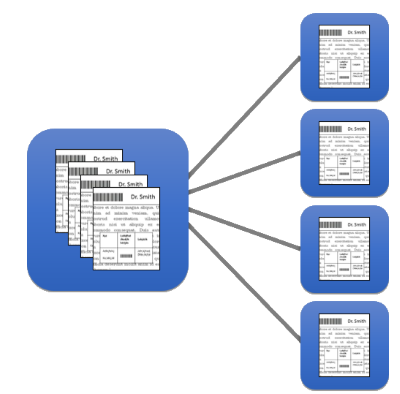
Easily import and assemble PDF text, PDF OCR, PDFText files, MS Word, Scanned Image files and more into consolidated documents. 


Privacy Auditing and Redaction

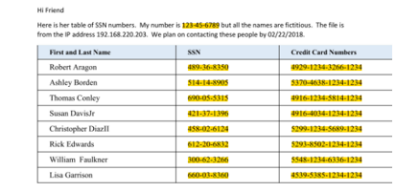
Secure your documents and remove sensitive information such as Social Security or Credit Card numbers. Our configurable platform allows you to create redaction identity and removal scripts on OCR'd or text-based files. 

Work From Any Device

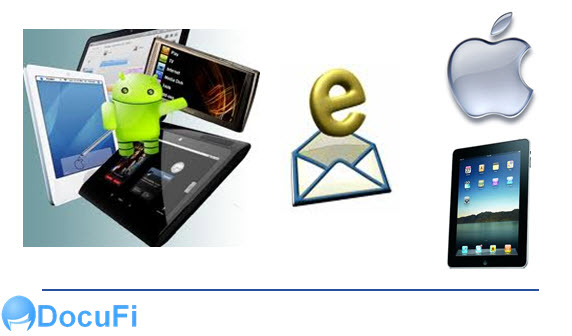
Our secure Document Cloud Services work on Android, iOS, MAC, Linux and Windows platforms.


AI Invoice Processing

Use our AI Cloud services to process unstructured documents including invoices, way bills, delivery notes and more using document classification and advanced OCR and AI capabilities.


Docs In The Clouds Key Features and Benefits:

  • Compatible across all major operating system environments
  • Watch for files to process in cloud Drives including AWS S3, DropBox, Google and SharePoint
  • Single sign on
  • Manage unlimited job profiles with individual folder assignments
  • Read 1D or 2D barcodes (including QR codes) for splitting, file naming, routing and more. See the Batch Processing on Plustek Scanner Video
  • NEW confidence-based barcode recognition
  • Automate file naming and folder creation. See the SlideShare.
  • Preview page splits and validate barcode reading and settings
  • Clean up images to increase accuracy and reduce storage needs See the SlideShare.
  • Use barcodes to create PDF bookmarks
  • Convert between TIFF and PDF formats to standardize your file formats. See PDF v. TIFF SlideShare
  • Secure your PDF files with Digital Rights Management
  • Easy, clear dashboard style user interface throughout the product line for minimal training and maximum ease of use.
  • Configure privacy redaction scripts to remove SSN, Credit Cards, Gender Identity and other sensitive text items

Learn More About the Document Automation Available with Docs in the Clouds Services

ImageRamp Batch


Register Today

Sign up Today for Simple and Powerful Document Processing

Sign up for our Docs In The Cloud Services to add simple and intelligent cloud based capabilities with no administrative overhead.  

 Register Today

A Visual Look at Key Docs In The Cloud Services

DocsInTheClouds Base Processing ($195/month)
  • Thin Client, Zero Administration
  • File importing from folders
  • Security and digital rights
  • File size management
  • Assemble and manipulate pages
  • File separation
  • Runs on iOS, Android, Windows, Linux Operating Systems
  • Import MSWord, PDF Text/Image and Scanned Images (JPG, PNG, TIFF)
  • Markup and annotate


DocsInTheClouds Standard Edition ($295/Month)
  • File import from Cloud Drives (SharePoint, Google Drive, DropBox, Amazon S3)
  • Split on barcode contains
  • Split on barcode Regex pattern
  • 1D and 2D barcodes
  • Export CSV of barcodes
  • PDF File Encryption and Digital Rights
  • Assign profiles to watched folders
  • Includes ImageRamp PDF Composer for assembly and privacy redaction


DocsInTheClouds Privacy Edition ($395/Month)
    • Whiteout, Blackout Redaction
    • Customizable Scripts to Highlite, Whiteout or Blackout content
  • Infraction Auditing
  • Regular Expressions for text mining


DocsInTheClouds AI for Invoices/Delivery Notes/AP (Per Document Pricing)
  • Multi-Threaded (Dual and Quad)
  • Privacy Auditing and Redaction
  • Email notifications on memory issues
  • Restart on crash and memory issues
  • Enhanced Quality Control Reporting
  • Multiple OCR engines
  • Supports windows servers
  • Emails you with details of crashes restarts or other problems
  • All the functions listed above for Batch Pro Edition


ImageRamp DocsInTheClouds Custom Development-Call for Docs In The Cloud Services Pricing
  • ImageRamp functions as defined for ImageRamp Batch Pro
  • Email requester
  • Natural language parsing
  • Analytics and visualization
  • Driverless scanner integration
  • Mobile capture


Docs In The Clouds Key Features and Benefits:

  • Compatible across all major operating system environments
  • Watch for files to process in cloud Drives including AWS S3, DropBox, Google and SharePoint
  • Single sign on
  • Manage unlimited job profiles with individual folder assignments
  • Read 1D or 2D barcodes (including QR codes) for splitting, file naming, routing and more. See the Batch Processing on Plustek Scanner Video
  • NEW confidence-based barcode recognition
  • Automate file naming and folder creation. See the SlideShare.
  • Preview page splits and validate barcode reading and settings
  • Clean up images to increase accuracy and reduce storage needs See the SlideShare.
  • Use barcodes to create PDF bookmarks
  • Convert between TIFF and PDF formats to standardize your file formats. See PDF v. TIFF SlideShare
  • Secure your PDF files with Digital Rights Management
  • Easy, clear dashboard style user interface throughout the product line for minimal training and maximum ease of use.
  • Configure privacy redaction scripts to remove SSN, Credit Cards, Gender Identity and other sensitive text items

Learn More About the Document Automation Available with Docs in the Clouds Services

ImageRamp Batch


downlaod

Free

Download our most popular solution for your document processing needs.  You'll get a free version of ImageRamp Composer, a trial of ImageRamp Batch plus several fully functioning Free tools to produce OCR'd PDF, Create Barcode Separation Sheets, assemble PDF files and Validate barcode splits.

Our Customers

Free Barcode Scan Separator

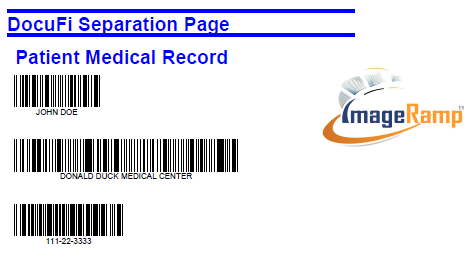
Use our free tool to create barcode cover pages to help you on your way to document process automation.

ImageRamp document capture and indexing softwareThe ImageRamptm Scan Separator, is a free tool, included in the ImageRamp 9.x Series download.  It is free to use to help you create barcode separation sheets that can be used during batch folder processing.  Use barcode cover sheets to route, index, split and name your documents. Easily automate your common document processing tasks with this simple batch separation creator. Whether you are creating batch scans of invoices, patient records, claim records, or financial documents, Scan Separator can create cover sheets or separator pages to help accelerate documents into your workflows. It is simple to install and use in your environment with ImageRamp Batch.

Easily:

  • Utilize barcodes to index, route, rename and split files
  • Customize fields names
  • Customize drop-down lists for fast, accurate data entry
  • Use optional onscreen keyboard
  • Produce PDF files for easy printing as compatible cover sheets


scan separator page for easy batch scanningSimple-to-Use Cover Sheet Creation
Easy Set-up

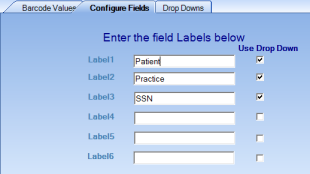
To set up the application for the first time, just label the barcode fields and create drop-down values if desired.   

Step 1:  Create the Barcode Labels


 Create Barcodes for Scan Separation Pages


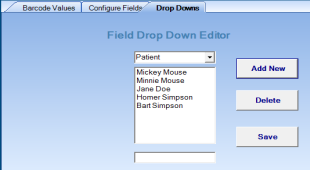
Step 2:  Create Drop-Down Values


 Create your own standard drop down menu options


Produce Adobe PDF Scan Separation Filesscan separator page for easy batch scanning

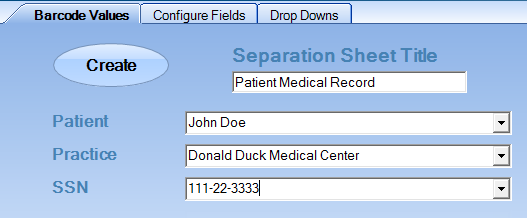
Now you can create your own separator sheets using the Barcode Value screen by typing the values or clicking on the down arrow to select from the pre-entered values. Click the Create Button and your sheet is available as a PDF file to print and/or save.create pdf barcoded scan separation files


Now you can Introduce Barcode-Driven Batch Scanning to your Document Capture

split at barcodes with cover sheets

With barcodes, you can automate the splitting, naming, workflow and destination path of your documents. With today's intelligent data capture systems like ImageRamp and low-cost, high-quality scanners; you have the flexibility to use standard barcodes in many ways, from splitting the files to routing and indexing. Here are some of the more common practical uses of barcodes.

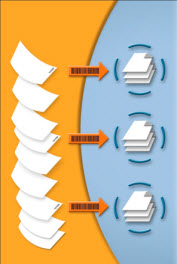
  • Split at Barcodes – Barcode enabled capture tools can search for barcodes in a scan stack and create new documents when a new or common barcode is found. New invoice numbers, patient records, repair orders or any other classification can be used allowing you to scan an entire stack of documents in a single pass. In some systems you can even ignore barcodes unless they have a specific splitting text identified, bypassing other unwanted barcode strings.
  • Bookmark at Barcodes - Instead of splitting at barcodes, barcodes can also be used to insert bookmarks in output PDF files. This option lets you keep a stack of scanned documents as one file, but add bookmarks for easy navigation through the file.
  • Classify Documents - Barcodes help identify the type of documents being processed and can be used to select the appropriate processes for a specific document type. Some systems will look at the content of the barcodes to determine the procedures to implement next.
  • Routing Files - Use barcode strings to determine or set the target path (or route) for your scanned documents within your computer's file system. Automatically create folders and subfolders based on the barcode values contained in your document sets, thus providing an automated way of storing and folder classifying your documents.
  • Indexing Metadata – Perhaps the most common use of barcodes is to contain metadata or indexing information intended for document management systems. Some approaches will have a key identifier that is matched up against data already indexed to associate a document set with the appropriate record or folder in the database.
  • Name Files - Use barcodes along with other system or document variables to create your output file names for scanned documents. 

 Need your Own Branding?

The free version can be extended to support your own logo and bannering with a purchased subscription. Contact us at This email address is being protected from spambots. You need JavaScript enabled to view it. for more details.

downlaodFree Barcode Validation Tool

Easily Verify your Barcodes are Properly Detected and Read

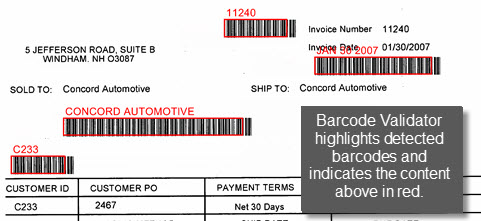
The ImageRamptm Barcode Validator utility, is a free tool to verify your barcodes are located on scanned documents and confirm the information contained in the barcode before you begin a data capture job. The Validator also lets users test file splitting based on barcode content or split every "n" pages. Whether your barcode information is used for indexing, file splitting, file naming or file routing, it is crucial your document capture solution correctly detects and captures the correct information.

Barcode Validator Features:

  • Works with PDF, TIFF and JPG input files
  • Detects 1D and 2D barcodes
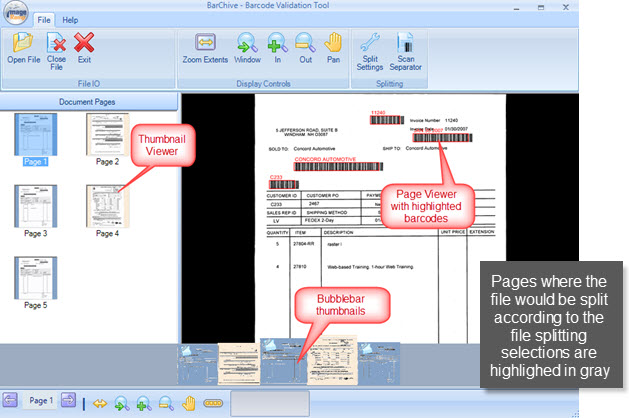
  • Previews where files would be split based on your file splitting selections for ImageRamp data capture solutions
  • Previews detected barcode content

Simple User Interface to View Pages, Splits and Barcode Data

With ImageRamp Barcode Validator's split-pane interface, easily view the located barcodes and the barcode data on each page of a scanned document. The interface also shows how the file would be split based on the barcodes if you have selected file splitting options for ImageRamp data capture

barcode validator interface overview

barcode validator interpreted barcodes

Just a Few Clicks to Start Verifying your Barcodes

TBarcode validation tool barcode settings tabo initiate this preview in the Page Viewer, users simply select the settings or options to indicate the file input, splitting and barcode options and then "Open" a file. 

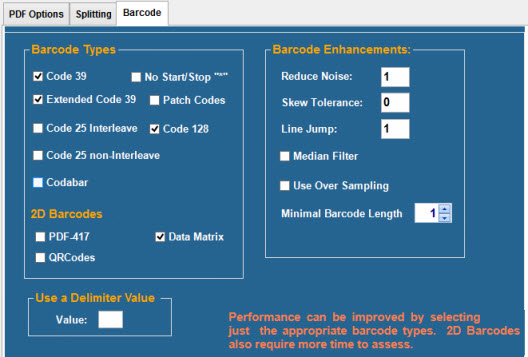
Using our highly sensitive barcode engine, ImageRamp Barcode Validator users can select the barcode types they are looking for and options to enhance the scanned barcode for the best possible barcode interpretation in the Barcode tab.

For PDF input files, PDF Options settings determine how the PDF input file is rendered for the software to process and the Splitting tab allows users to set up and test file splitting based on barcodes or split every "n" pages if desired.

Full Featured Data Capture Using Barcodes and OCR Technology with ImageRamp

The Free Barcode Validator can be used as a standalone tool to view and test barcode capture.  It can also be used inconjunction with ImageRamp for full-featured data capture and document scanning. 

Visit the HAIvia site
Register for free Access to your Hospitals data.

Free

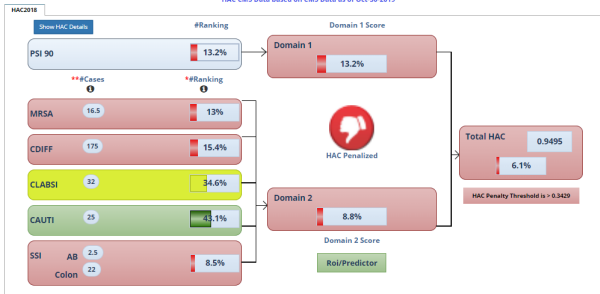
Register with us for free and you'll gain access to HAC scores, Infection data, HCAPS satisfaction scores and more.  Perform ROI what-if modeling based on actual reported data.

Free Hospital Infection Risk analysis and ROI Predictor

The HAIviatm platform provides you a free tool to easily monitor and perform cost benefit modeling of different scenarios around Healthcare Associated Infections (HAI's). Gain better insight on the cost and life impact HAI's is having with your facility or system.   Visit HAIvia.com to learn more. Hospital surfaces play an import role in the transmission of dangerous pathogens.

Easily:

  • Visualize CMS data on your specific hospital
  • Easily identify the HAC Score factors effecting your facilities reimbursement risks
  • Perform "What-If" scenarios to see the cost savings in Reimbursement penalties and saved HAI re-admission costs
  • Review historical data of all CMS infection rates to help identify trending issues
  • Produce PDF reports with ROI modeling and see your predicted HAC score and cost savings.


Simple-to-Use Infection Data Analysis

Easy Set-up

Easily visualize data effecting your facilities bottom line.  Simple controls allow you to perform What-If scenarios and you'll see the impact on your facilities ranking, HAC Score and cost savings. 

Visually analyze the influencers on your HAC score and see where you rank nationally within each infection type.


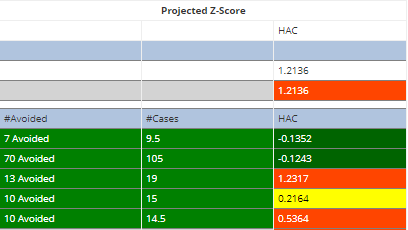
 Use easy Infection Reduction tools to see the impact on HAI avoidance, cost savings, and HAC scores.

See how many infections can be avoided and the impact on your predicted HAC score.  Use the tool to help identify where your most likely to realize savings from new programs and technologies.


Perform ROI analysis

Select from several HAI cost sources and see the ROI savings you can expect by implementing new programs and processes at your facility.  If your already in the lower quartile for HAC reporting, you'll gain additional savings by using HAIvia to help you identify areas needing solutions to improve your overall scoring and eliminate the reimbursement reductions.  


Upgrade to Full Data Access, Hospital System or full CMS data access

With an upgraded account, you'll gain greater access to the benefits offered through data visualization from HAIvia.  , you can automate the splitting, naming, workflow and destination path of your documents. With today's intelligent data capture systems like ImageRamp and low-cost, high-quality scanners; you have the flexibility to use standard barcodes in many ways, from splitting the files to routing and indexing. Here are some of the more common practical uses of barcodes.

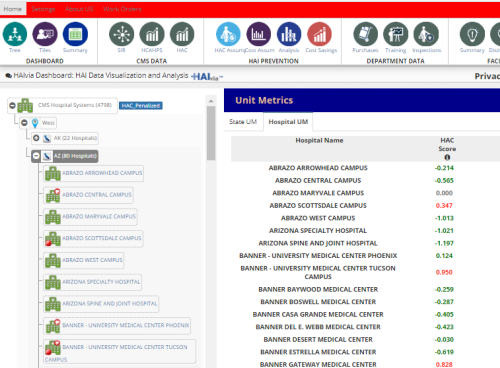
  • System Facility Access –Upgrade to a system subscription and gain access to the data for each facility in your hospital system.  You'll have tree level point and click access to review historical data, perform HAC modeling, ROI and HAC predictor. 
  • Full Access to All Hospitals - Review hospitals at the region or state level and rank facilities by HAC score or infection rates.  You can easily identify facilities ideal for your products or solutions across any infection classification.
  • Use your own HAI Cost factors - Customize the ROI modeler with your own cost factors for c.diff, MRSA, Cauti, CLABSI and SSI infections.  We use industry sources but you can customize it to your own liking.  
  • Point and Click navigation - Easily navigate the complexities of CMS data with the simple interface.  Use it like a common folder explorer but with all data of CMS reporting hospitals presented in a easy point and click environment.  

  Need your Own Branding?

The free version can be used with soft white label branding of your own company banner, when users sign-up and register to our certified partners.   Contact us at This email address is being protected from spambots. You need JavaScript enabled to view it. for more details.